Turret vs bullet vs dome: how form factor changes your mounting
The camera's shape decides which mounts you even need. A practical rundown of how turret, bullet and dome cameras mount, and the accessories each one calls for.
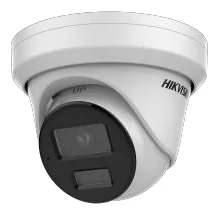
Before you think about part numbers, the camera’s body style has already narrowed your accessory list. A bullet mounts nothing like a dome, and a turret sits somewhere in between. If you know how each form factor wants to be mounted, you can walk into a job with the right brackets instead of the ones that were left in the van.
Turret (the “eyeball”)
Turrets are the compact ball-in-a-socket cameras that have quietly become the default for a lot of installs. The ball aims inside a fixed base, which keeps the lens flush and cuts down the infrared flare that plagues domes.
Mounting-wise, a turret ships with a base that surface-mounts to a ceiling or soffit. What you add depends on the run:
- Surface cabling? You want a junction box so the cable and connector have somewhere to live. In the Hikvision range that is usually the DS-1260ZJ; for Dahua the PFA130-E; for Uniview the TR-JB03-G-IN.
- Onto a wall at an angle? A wall mount or pendant arm gets the field of view right.
Browse turrets by brand: Hikvision, Dahua.
Bullet
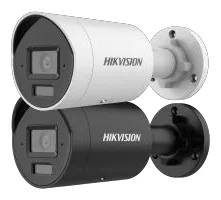
Bullets are the cylindrical, point-where-you-aim cameras built for longer throws and obvious deterrence. The big advantage for mounting is that the bracket is integrated: the camera comes on an arm you tilt and pan by hand, so a plain wall or eave install often needs nothing extra.
Where you do need accessories:
- Poles. A bullet on a pole needs a pole-mount adapter. The Hikvision DS-1275ZJ-SUS and Dahua PFA152-E are the widely compatible ones; Uniview uses the TR-UP06-IN.
- Conduit or tidy cabling. A wall-mount bracket or junction box gives you a clean cable entry instead of a hole behind the camera.
Because bullets sit on an arm away from the surface, this is the form factor where load and lever arm matter most. Browse bullets: Hikvision, Dahua.
Dome
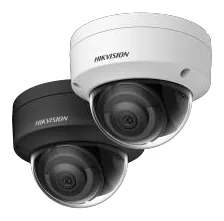
Domes are the low-profile, vandal-resistant cameras you see flush to a ceiling. Their whole design goal is to disappear into the surface, which makes the mount choice mostly about the surface.
- Standard ceiling. The dome surface-mounts directly, often with a junction box underneath for cabling.
- High or suspended ceiling. A pendant mount drops the camera to a usable height. Hikvision DS-1271ZJ-140, Dahua PFB220C, Uniview TR-CM24-IN.
- Flush into a tile or soffit. An in-ceiling or flush mount recesses the body for the cleanest look.
Browse domes: Hikvision, Uniview.
The one accessory that ignores form factor
Corner mounts are the exception: whether you are hanging a turret, bullet or dome off the corner of a building, you use a corner adapter like the Hikvision DS-1276ZJ-SUS or the heavy-duty Dahua PFA151. The camera’s shape still decides the box underneath, but the corner bracket is chosen by the wall, not the camera.
Putting it together
Form factor gets you to the right shortlist: turrets and domes lean on junction boxes and pendants, bullets lean on wall arms and pole adapters, and corners are their own thing. From there, the specific part is decided by the camera’s own datasheet, which is what every camera page on this site shows you, receipt and all. Next stops: choosing a junction box and decoding the Hikvision and Dahua part numbers.
Parts featured in this guide
Explore the datasheet-verified data
Everything in this guide is backed by the parts we index. Jump straight in: